Using RIFE Network to DeSparse - Full
If you are using the PyPi version of TomoSuitePY, Please view Installation of TomoSuitePY and Starting A Project before attempting to load in the module.
RIFE Conda Environment Installation - Command Line
Use the following code inside your terminal to install the required packages to be used for RIFE network.
# Installing RIFE packages
conda create -n rife_tomosuite --file /location/to/tomosuitpy/github/clone/envs/rife.yml

source activate rife_tomosuite

ipython kernel install --user --name=rife_tomosuite
Basic Conda Environment Installation - Command Line
Basics of tomosuitepy (excluding RIFE, Noise2Noise, TomoGAN, and Deepfill networks) - Used for GridRec/SIRT Reconstructions as well as projection extraction.
# Installing basic packages
conda create -n test_basic python=3.6
conda env update -n test_basic --file /location/to/tomosuitpy/github/clone/envs/basic.yml

source activate test_basic

ipython kernel install --user --name=test_basic
Starting A Project - Jupyter
In order to begin using TomoSuitePY, one must create a project for their .h5 data. Sometimes it is necessary to create multiple projects for a single task, but this is only when one is to use a sacraficial sample for network training. All use cases of a second project are detailed in the documentation of TomoSuite
It is also imperative that the User has the test_basic conda enviroment installed for this part of the tutorial.
Importing TomoSuitePY
import sys
sys.path.append('/path/to/tomosuitepy/github/clone/tomosuitepy/')

from tomosuitepy.base.start_project import start_project
from tomosuitepy.base.extract_projections import extract
Starting A Project
# The directory path where the raw experimental file lives
datadir = '/local/data/experimental/'

# The file name of the data the User would like to import
fname = 'Experiment_01.h5'

# The folder path where the User would like to store project data to
basedir = '/local/data/project_01/'


start_project(basedir=basedir)


extract(datadir=datadir,
            fname=fname,
            basedir=basedir,
            chunking_size=10) # Set chunk_size4downsample to 1 if you have a lot of RAM
DeSparse Angle With Rife Neural Network
If any User would like to improve sparse angle tomographic scans, please use the following protocols.
Please now initiate the rife_tomosuite network for this part of the tutorial
Loading In TomoSuitePY - Jupyter
import sys
sys.path.append('/location/of/tomosuitepy/github_repo/')
Creating RIFE Terminal Command
from tomosuitepy.easy_networks.rife.data_prep import full_res_rife

full_res_rife(basedir)
Interactive Fine Tune Rotation Center - Jupyter
For this section please make sure that the base conda environment is activated
import tomopy
from tomosuitepy.base.reconstruct import reconstruct_data, plot_reconstruction, plot_reconstruction_centers

basedir = '/local/data/path/'


def tomo_recon(prj, theta, rot_center, user_extra=None):

    recon = tomopy.recon(prj, theta,
                        center=rot_center,
                        algorithm='gridrec',
                        ncore=8)
    return recon, user_extra


slcs, user_extra = reconstruct_data(basedir,
                    rot_center=616, # This has no relevence when rot_center_shift_check is enabled
                    start_row=500, # Keep this to a single image for rotation_center_check
                    end_row=501, # Keep this to a single image for rotation_center_check
                    reconstruct_func=tomo_recon, # Allows the user to define their own recon function
                    network=None, #  Keep this to None for rotation_center_check
                    power2pad=False, #  Keep this to False for rotation_center_check
                    edge_transition=None, # Keep this to None for rotation_center_check
                    chunk_recon_size=1,
                    rot_center_shift_check=40 # Number of rotation centers to try before and after absolute image center
                                   )

plot_reconstruction_centers(slcs[0:], basedir, clim=(0, 0.01), figsize=(20, 20))
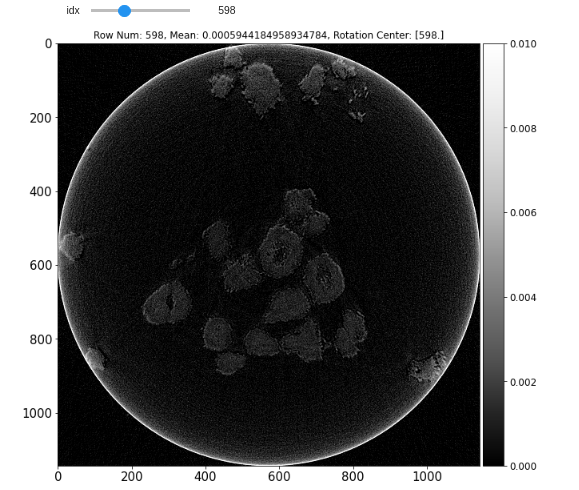
Use TomoSuite To Reconstruct New Frames - Jupyter
Use the “base” conda environment for this step. Tomopy/Astra do not play well with the RIFE network requirements. View installation documentation for this step.
frames_folder = 'frames'
output_image_type = '.tif'
apply_log = False

slcs_v1, user_extra = reconstruct_data(basedir,
                                        rot_center=598,
                                        reconstruct_func=tomo_recon,
                                        network='rife',
                                        start_row=None,
                                        end_row=None,
                                        power2pad=True,
                                        rife_types=[frames_folder, output_image_type, apply_log])


fig = plot_reconstruction(slcs_v1, clim=(None, None), cmap='rainbow')
Command Line Interface (CLI)
TomoSuitePY also comes with a command line interface for RIFE. The following can be run in a bash terminal, however it does have limited features compared to it’s Jupyter function counterpart.